

























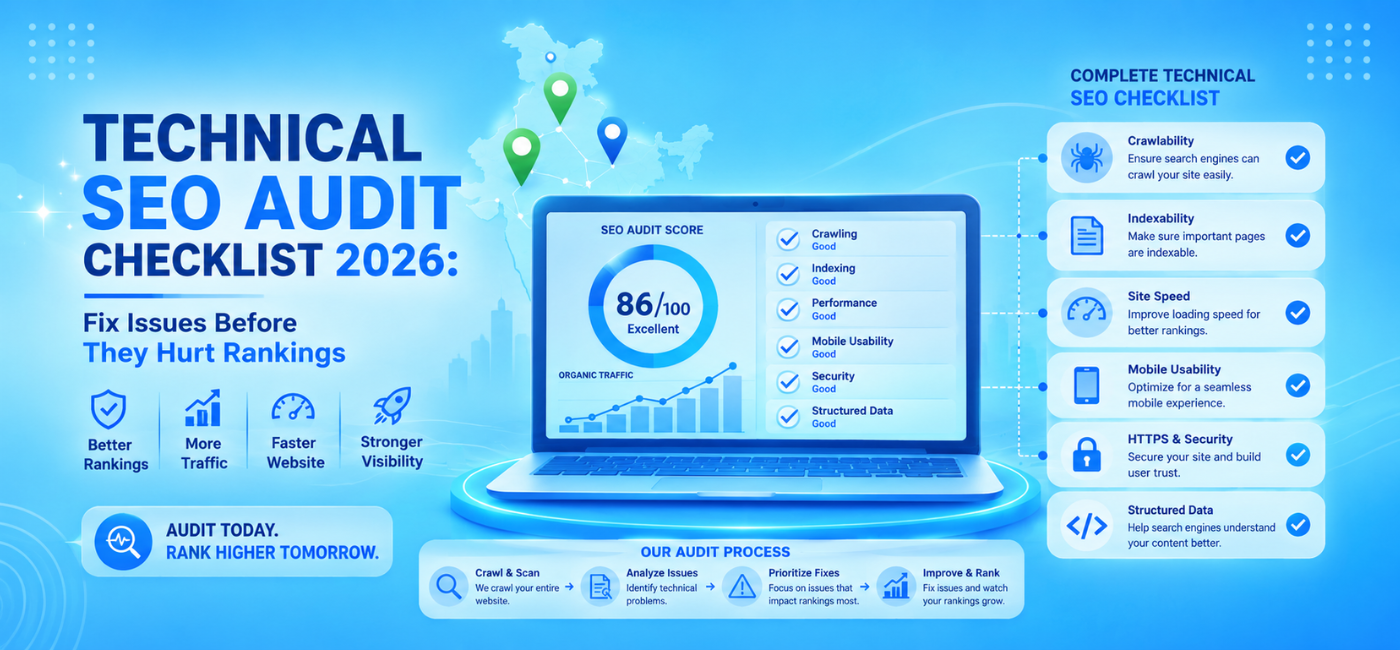
A website can have strong content, relevant keywords, and quality backlinks but still struggle to rank if search engines cannot crawl, render, index, or understand its important pages.
That is why a technical SEO audit checklist should be part of every serious SEO strategy. Technical SEO identifies the hidden issues that affect search performance, including blocked pages, duplicate URLs, slow templates, broken redirects, weak internal linking, JavaScript rendering problems, missing structured data, and mobile usability failures.
In 2026, technical SEO also needs to account for real-user performance data, modern Core Web Vitals, structured data validation, AI crawler policies, dynamic rendering, and website changes that happen after launches or redesigns. A technical audit is not a one-time report. It is a process for protecting visibility, traffic, leads, and revenue.
Table of Contents
- What is a technical SEO audit?
- Why technical SEO matters in 2026
- How often to run an audit
- Start with website inventory
- Crawlability checklist
- Indexing checklist
- XML sitemap checklist
- Robots.txt checklist
- Canonical tag checklist
- Redirect and error-page checklist
- Site architecture and internal links
- Core Web Vitals checklist
- Mobile SEO checklist
- JavaScript rendering checklist
- Structured data checklist
- Security and HTTPS checklist
- International SEO checklist
- ECommerce technical SEO checklist
- AI crawler and AI search considerations
- How to prioritize audit fixes
- 30-day technical SEO action plan
- FAQs
- Conclusion and CTA
What Is a Technical SEO Audit?
A technical SEO audit is a structured review of the technical elements that affect whether search engines can discover, crawl, render, index, and rank your website.
It examines issues such as:
- Crawl errors.
- Blocked pages.
- Noindex tags.
- XML sitemaps.
- Robots.txt rules.
- Canonical tags.
- Duplicate content.
- Redirects.
- Broken links.
- Page speed.
- Core Web Vitals.
- Mobile usability.
- JavaScript rendering.
- Structured data.
- HTTPS security.
- International targeting.
- Website architecture.
Think of technical SEO as the foundation beneath your content and marketing. If the foundation is weak, even excellent pages may not perform as well as they should.
A modern technical audit should review crawling, indexing, performance, structured data, JavaScript rendering, and template-level issues rather than relying only on a basic automated scan.
Why Technical SEO Matters in 2026
Websites are more complex than they were a few years ago. Many sites use dynamic JavaScript frameworks, third-party scripts, personalization systems, product filters, AI-generated content modules, chat tools, and multi-market structures.
These tools can improve user experience, but they can also create SEO problems when not implemented carefully.
Technical SEO matters because it helps you:
- Protect valuable pages from accidental deindexing.
- Prevent duplicate URLs from competing with each other.
- Improve mobile experience.
- Make pages faster and more responsive.
- Ensure important content can be rendered.
- Help search engines understand page context.
- Reduce crawl-budget waste.
- Support product, service, and location-page visibility.
- Prevent traffic losses during redesigns or migrations.
- Improve the value of content and link-building investments.
Technical SEO guidance for 2026 consistently emphasizes crawlability, indexation, Core Web Vitals, schema, mobile usability, and JavaScript rendering as core audit areas.
How Often Should You Run a Technical SEO Audit?
The correct frequency depends on website size, platform, development activity, and business risk.
| Website type | Suggested audit frequency |
| Small brochure website | Every 6–12 months |
| Local business website | Every 6 months |
| Active blog or content site | Quarterly |
| Ecommerce website | Monthly health checks and quarterly deep audits |
| SaaS or web application | Monthly checks and quarterly audits |
| Enterprise or multi-country website | Continuous monitoring and quarterly deep audits |
| Website undergoing redesign or migration | Before, during, and after launch |
Run an audit immediately if you notice:
- A sudden traffic drop.
- Important pages disappearing from Google.
- Search Console coverage warnings.
- Major website updates.
- New CMS or platform migration.
- Slow page-speed reports.
- Declining conversions.
- A large increase in 404 errors.
- A change in robots.txt or noindex settings.
Start With a Website Inventory
Before checking individual problems, define the scope of the site.
Document:
- Main domain.
- HTTP and HTTPS versions.
- www and non-www versions.
- Subdomains.
- Subfolders.
- Country or language sections.
- CMS platform.
- Hosting and CDN setup.
- JavaScript framework.
- Ecommerce platform.
- Important templates.
- Existing XML sitemaps.
- Google Search Console properties.
- Bing Webmaster Tools properties.
- Analytics setup.
- Tag Manager access.
A website inventory prevents teams from auditing only the homepage or a small part of a larger system.
For example, an eCommerce site may include product pages, collection pages, filters, internal search URLs, review pages, category pages, blogs, account pages, and checkout steps. Each may require different technical rules.
Crawlability Checklist
Crawlability refers to whether search engines can access and follow the pages on your site.
Check these items
- Important pages return a 200 OK status.
- Important pages are not blocked by robots.txt.
- Important pages are not blocked by firewall or security tools.
- Important pages do not require login access.
- Internal links use crawlable HTML links.
- JavaScript does not hide essential navigation.
- No important sections are blocked accidentally.
- Crawl traps are controlled.
- Infinite URL spaces are prevented.
- Parameter URLs are handled carefully.
- Pagination is reviewed.
- Orphan pages are identified.
A crawler should be able to move from important pages to related pages through logical internal links. If your pages are only reachable through site search, scripts, or unlinked URLs, they may be harder to discover.
Technical SEO checklists commonly recommend reviewing robots.txt, XML sitemaps, blocked URLs, crawl errors, server issues, broken internal links, and orphan pages early in an audit.
Indexing Checklist
Crawlable does not always mean indexable. A page can be accessible to search engines but still excluded from search results.
Review Google Search Console’s indexing reports and compare indexed URLs with your intended canonical pages.
Check these items
- Important pages are indexed.
- Important pages do not contain accidental noindex tags.
- Important pages do not have accidental X-Robots-Tag: noindex headers.
- Pages listed in XML sitemaps are indexable.
- Duplicate pages are consolidated.
- Soft 404 pages are fixed.
- Redirected URLs are not listed as indexable.
- Thin pages are improved, consolidated, or intentionally noindexed.
- “Crawled, currently not indexed” pages are reviewed.
- “Discovered, currently not indexed” pages are reviewed.
- Canonical selections match your preferred URLs.
Google Search Console’s page-indexing data can help identify pages that should be indexed but are not, as well as pages that may be indexed when they should not be.
Do not try to index every URL on your website. Focus on pages that provide original value, meet user intent, and support your business objectives.
XML Sitemap Checklist
An XML sitemap helps search engines discover the important URLs you want indexed. It should not become a dump of every URL the website can generate.
Check these items
- Sitemap is accessible.
- Sitemap uses valid XML formatting.
- Sitemap is submitted in Google Search Console.
- Sitemap is referenced in robots.txt.
- Sitemap contains only canonical URLs.
- Sitemap contains only live, indexable URLs.
- Sitemap excludes redirects.
- Sitemap excludes 404 and soft 404 pages.
- Sitemap excludes noindex pages.
- Sitemap is updated when pages are added or removed.
- Large sites use segmented sitemaps where needed.
- Sitemap URL count roughly aligns with canonical indexable URLs.
A useful sitemap helps search engines prioritize your best pages. If it includes broken, redirected, duplicate, or blocked URLs, it sends inconsistent signals.
Robots.txt Checklist
The robots.txt file gives crawling instructions. A small mistake in this file can block important sections of the website.
Check these items
- The file is available at /robots.txt.
- Syntax is valid.
- Important pages are not disallowed accidentally.
- CSS and JavaScript required for page rendering are not blocked unnecessarily.
- Development or staging folders are protected appropriately.
- Internal search results and crawl traps are reviewed.
- Sitemap location is included.
- User-agent rules match your intent.
- Robots rules are reviewed after website updates.
A robots.txt file should not be used as the only method for keeping pages out of Google’s index. If a page must not appear in search results, use an appropriate noindex directive and ensure search engines can crawl the page to see it.
Canonical Tag Checklist
Canonical tags indicate which URL should be treated as the preferred version when duplicate or similar pages exist.
Common duplicate URL sources include:
- HTTP and HTTPS versions.
- www and non-www versions.
- Trailing slash variations.
- Uppercase and lowercase URLs.
- Tracking parameters.
- Product variants.
- Filtered category pages.
- Pagination.
- Printer-friendly pages.
- Search-result pages.
Check these items
- Important pages use self-referencing canonical tags where appropriate.
- Canonicals point to the preferred URL.
- Canonical URLs return 200 OK.
- Canonical URLs are indexable.
- Canonicals are not pointing to redirected URLs.
- Canonicals are not pointing to noindex pages.
- Pagination and faceted URLs are reviewed.
- Product variants use correct canonical logic.
- Canonical signals do not conflict with hreflang.
- Canonical tags are consistent across templates.
Current technical audit guidance recommends checking that each key piece of content has one clear canonical URL and that canonical tags are self-referencing where appropriate.
Redirect and Error-Page Checklist
Redirects protect user experience and SEO equity when URLs change. Errors should be monitored so visitors and crawlers do not hit dead ends.
Check redirects
- HTTP redirects to HTTPS.
- Non-preferred domain redirects to preferred domain.
- Old URLs redirect to the most relevant new URLs.
- Redirects use a single hop where possible.
- Redirect chains are reduced.
- Redirect loops are fixed.
- Temporary redirects are reviewed.
- Internal links do not point to redirected URLs.
- Redirected URLs are removed from sitemaps.
Check errors
- Broken internal links are fixed.
- Important external backlinks pointing to 404 pages are redirected where appropriate.
- 404 pages offer useful navigation.
- Soft 404 pages are corrected.
- Server errors are investigated.
- Deleted products or services have a defined handling rule.
- 410 status codes are used only where intentionally needed.
Do not redirect every deleted URL to the homepage. Redirect users to the closest relevant replacement, category, or helpful alternative where one exists.
Site Architecture and Internal Linking
Site architecture determines how pages are grouped and how easily users and crawlers can reach them.
A strong structure usually includes:
- Clear top-level navigation.
- Logical category hierarchy.
- Descriptive URLs.
- Breadcrumb navigation.
- Relevant contextual internal links.
- A limited number of clicks to reach key pages.
- Clear content hubs.
- No important orphan pages.
Audit questions
- Can users reach key product, service, category, and contact pages easily?
- Are important pages buried too deeply?
- Do internal links use descriptive anchor text?
- Are there broken internal links?
- Are high-value pages receiving internal links?
- Are category pages connected to product or service pages?
- Are blog articles linked to relevant commercial pages?
- Are there overly repetitive footer links?
For businesses that need content strategy, technical SEO, and internal linking to work together, NP Creations’ AI SEO services support research, content planning, technical improvements, and conversion-focused search growth.
Core Web Vitals Checklist
Core Web Vitals measure real user experience. They should be assessed with field data where possible, not only lab tests.
| Metric | Good target | What it measures |
| LCP | 2.5 seconds or less | Main content loading speed |
| INP | 200 milliseconds or less | Interaction responsiveness |
| CLS | 0.1 or less | Visual stability |
These thresholds are widely used in 2026 technical SEO audit guidance.digitalapplied+2
LCP improvements
- Optimize hero images.
- Preload key visual assets carefully.
- Improve server response time.
- Use a CDN where appropriate.
- Reduce render-blocking resources.
- Optimize fonts.
- Reduce unused CSS and JavaScript.
INP improvements
- Reduce heavy JavaScript execution.
- Break up long tasks.
- Remove unnecessary third-party scripts.
- Optimize event handlers.
- Test forms, filters, menus, and checkout interactions.
- Review scripts loaded by chat, analytics, ads, and widgets.
CLS improvements
- Set image width and height attributes.
- Reserve space for ads and embeds.
- Avoid injecting content above existing content.
- Use stable font loading.
- Test mobile templates for layout movement.
Mobile SEO Checklist
Mobile experience matters because many users and Google’s crawlers access pages through the mobile version.
Check these items
- Layout works on common phone sizes.
- Text is readable without zooming.
- Buttons and links are easy to tap.
- Navigation works correctly.
- Forms are usable on mobile.
- Content is not hidden on mobile.
- Mobile pages load quickly.
- Pop-ups do not block important content.
- Videos and media are responsive.
- Structured data is present on the mobile-rendered version.
- Mobile and desktop versions contain equivalent core content.
Test key conversion pages such as product pages, service pages, contact forms, booking flows, and checkout pages on real devices.
JavaScript Rendering Checklist
JavaScript can create interactive experiences, but it can also delay or hide content from crawlers if implemented incorrectly.
Check these items
- Important text content is available in rendered HTML.
- Important links are crawlable.
- Menus do not rely only on inaccessible scripts.
- Lazy-loaded content appears when appropriate.
- Infinite-scroll content has crawlable pagination or links.
- Client-side routing does not create duplicate URLs.
- Rendering errors are identified.
- JavaScript-heavy templates are tested with URL Inspection.
- Key content is not hidden behind user interactions only.
- Third-party scripts do not block rendering.
Modern audits should compare HTML source, rendered output, and actual crawl behavior—especially for JavaScript frameworks, headless websites, and ecommerce sites.
Structured Data Checklist
Structured data helps search engines understand information such as products, organizations, breadcrumbs, articles, reviews, FAQs, and events.
It does not guarantee rich results, but valid markup can improve machine readability.
Check these items
- Schema matches visible page content.
- Product pages use relevant product schema.
- Offer data matches current pricing and availability.
- Review markup follows applicable guidelines.
- Breadcrumb markup reflects actual navigation.
- Organization schema uses accurate business details.
- Article schema is used on eligible content.
- Local business schema reflects NAP information accurately.
- JSON-LD is valid.
- Rich Result Test errors are fixed.
- Outdated schema properties are removed.
Do not use schema to mark up content that does not exist visibly on the page. Structured data should clarify real content, not create misleading signals.
Security and HTTPS Checklist
Security is a basic website requirement. Users should not see warnings when visiting your pages or submitting forms.
Check these items
- Site uses HTTPS.
- HTTP redirects to HTTPS.
- SSL certificate is valid and renewed.
- No mixed-content errors exist.
- Forms submit securely.
- Sensitive pages use proper security headers where appropriate.
- Vulnerable plugins, themes, and libraries are updated.
- Admin access is protected.
- Backups are active and tested.
- Malware or hacked-content warnings are monitored.
Security issues can damage user trust, conversion performance, and search visibility.
International SEO Checklist
If your business targets multiple countries or languages, include international SEO in the audit.
Check these items
- Country or language URL structure is consistent.
- Hreflang tags are valid.
- Each language or regional version references itself.
- Reciprocal hreflang references work.
- Hreflang URLs are canonical and indexable.
- x-default is used where appropriate.
- Localized pages are not simply duplicated.
- Currency, language, and shipping details match the market.
- Country pages are included in relevant sitemaps.
- Canonical and hreflang signals do not conflict.
For Indian companies expanding outside domestic markets, NP Creations’ International SEO services support location-focused strategies designed for global ranking and growth.
Ecommerce Technical SEO Checklist
Ecommerce sites create unique technical challenges because of product variants, filters, inventory changes, reviews, and large page counts.
Check these items
- Product pages have unique titles and descriptions.
- Collection pages are indexable where they add value.
- Filter URLs are controlled.
- Faceted navigation does not create infinite crawl paths.
- Product variants use correct canonical tags.
- Out-of-stock products have a defined rule.
- Discontinued products redirect appropriately when replacements exist.
- Pagination is crawlable.
- Product schema is valid.
- Price and availability are accurate.
- Internal linking supports top categories and products.
- Internal search results are not creating low-value indexable pages.
- Image assets are optimized.
- Checkout and key pages are mobile-friendly.
For Shopify stores, platform-specific SEO work can include product, collection, technical, schema, site-speed, and internal-linking improvements. NP Creations’ Shopify SEO services are designed to improve store visibility, relevant rankings, qualified traffic, and sales performance.
AI Crawler and AI Search Considerations
In 2026, businesses are also reviewing how AI systems access and reference website content. This should not replace foundational Google SEO, but it can be part of a broader technical policy.
Review:
- AI crawler settings in robots.txt match business policy.
- Important public content is accessible where appropriate.
- Sensitive content is protected.
- Structured content is easy to interpret.
- Brand, organization, product, and service information is consistent.
- Important pages include clear authorship, dates, and source information where relevant.
- Pages offer direct answers as well as detailed explanation.
- Content is original and not thin or duplicated.
Some 2026 audit frameworks include reviewing AI crawler access alongside Google and Bing crawler accessibility, but the specific policy should be determined by your business, legal, content, and data-protection requirements.w3corner+1
How to Prioritize Audit Fixes
A long audit report can overwhelm teams. Prioritize issues based on business impact, confidence, effort, risk, and urgency.
Use this framework:
| Priority | Issue type | Example |
| Critical | Prevents crawling or indexing | Important pages blocked by robots.txt or noindex |
| High | Affects major templates or revenue pages | Wrong canonicals on product pages |
| Medium | Limits performance or usability | Slow LCP on collection pages |
| Low | Small improvement opportunity | Minor metadata inconsistency |
| Monitor | Not urgent but worth tracking | Low-volume crawl warnings |
Start with issues that affect:
- Revenue pages.
- High-traffic landing pages.
- Sitewide templates.
- Indexation.
- Crawlability.
- Mobile conversion paths.
- Major site migrations.
- Security and trust.
A disciplined audit should prioritize fixes by impact and confidence rather than treating every finding as equally urgent.rivuletiq+1
30-Day Technical SEO Action Plan
1 Week: Crawl and indexation
- Crawl the website.
- Review Google Search Console indexing reports.
- Check robots.txt.
- Check XML sitemaps.
- Find noindex issues.
- Identify broken links and major errors.
- Review canonical tags.
2 Week: Performance and mobile
- Review Core Web Vitals field data.
- Test key templates in PageSpeed Insights.
- Optimize hero images.
- Audit third-party scripts.
- Test mobile navigation and forms.
- Check layout shifts.
3 Week: Structure and schema
- Review internal links.
- Find orphan pages.
- Improve breadcrumbs.
- Validate structured data.
- Check page templates.
- Review ecommerce or location-page structure.
4 Week: Fix, validate, and monitor
- Implement high-priority fixes.
- Test redirects.
- Resubmit important sitemaps if needed.
- Validate fixes in Search Console.
- Track performance changes.
- Create ongoing monitoring tasks.
- Plan the next audit cycle.
Frequently Asked Questions
1. What is a technical SEO audit checklist?
It is a structured list of checks used to find issues affecting crawlability, indexing, speed, mobile usability, internal links, structured data, redirects, JavaScript rendering, and overall website health.
2. How often should I run a technical SEO audit?
Small websites can usually run a deep audit every 6–12 months. Ecommerce, SaaS, content-heavy, and enterprise websites should run regular monitoring and more frequent audits, especially after releases or migrations.
3. What is the most important technical SEO issue to fix first?
Start with issues that stop search engines from crawling or indexing important pages, such as accidental robots.txt blocks, noindex directives, broken canonicals, server errors, and incorrect redirects.
4. Do Core Web Vitals affect SEO?
Core Web Vitals are part of a broader page-experience picture. They are useful indicators of loading speed, interaction responsiveness, and visual stability. In 2026, common targets are LCP at or below 2.5 seconds, INP at or below 200 milliseconds, and CLS at or below 0.1.digitalapplied+1
5. How do I find pages that Google has not indexed?
Use the Pages report in Google Search Console and compare it with your intended canonical URLs and XML sitemap. Review reasons such as “Crawled, currently not indexed,” “Discovered, currently not indexed,” and blocked or noindex pages.involvedigital+1
6. Is JavaScript bad for SEO?
JavaScript is not automatically bad. Problems occur when it delays rendering, hides important content, prevents crawling of links, creates duplicate URLs, or makes key content unavailable to search engines and users.
7. Do I need professional help for a technical SEO audit?
Professional help can be valuable for large websites, ecommerce stores, international sites, migrations, JavaScript frameworks, complex indexation issues, and recurring traffic drops. A specialist can translate findings into a prioritized implementation roadmap.
Conclusion
Technical SEO is the infrastructure that supports every other SEO activity. Great content and strong backlinks cannot perform at their full potential if search engines cannot crawl, render, index, and understand your important pages.
Use this technical SEO audit checklist to review crawlability, indexing, sitemaps, robots.txt, canonicals, redirects, speed, mobile experience, JavaScript, schema, and site architecture. Then prioritize fixes by business impact rather than trying to solve every small issue at once.
A regular technical audit helps protect rankings, improve user experience, prevent costly traffic losses, and create a stronger foundation for sustainable SEO growth.
Call to Action
Need a detailed technical review of your website, ecommerce store, or SEO foundation? Explore NP Creations’ AI SEO services for technical optimization, keyword research, content planning, performance analysis, and growth-focused SEO support.
For Shopify-specific technical SEO, product-page optimization, collection-page strategy, and organic sales support, explore Shopify SEO services.